What Is a QR Menu? A Complete Guide to QR Code Menus (2026)
What a QR menu is and how it works, the four kinds of QR code menu, how they compare with paper and PDF menus, what they cost, the rules to know and how to choose one.
· 21 min read
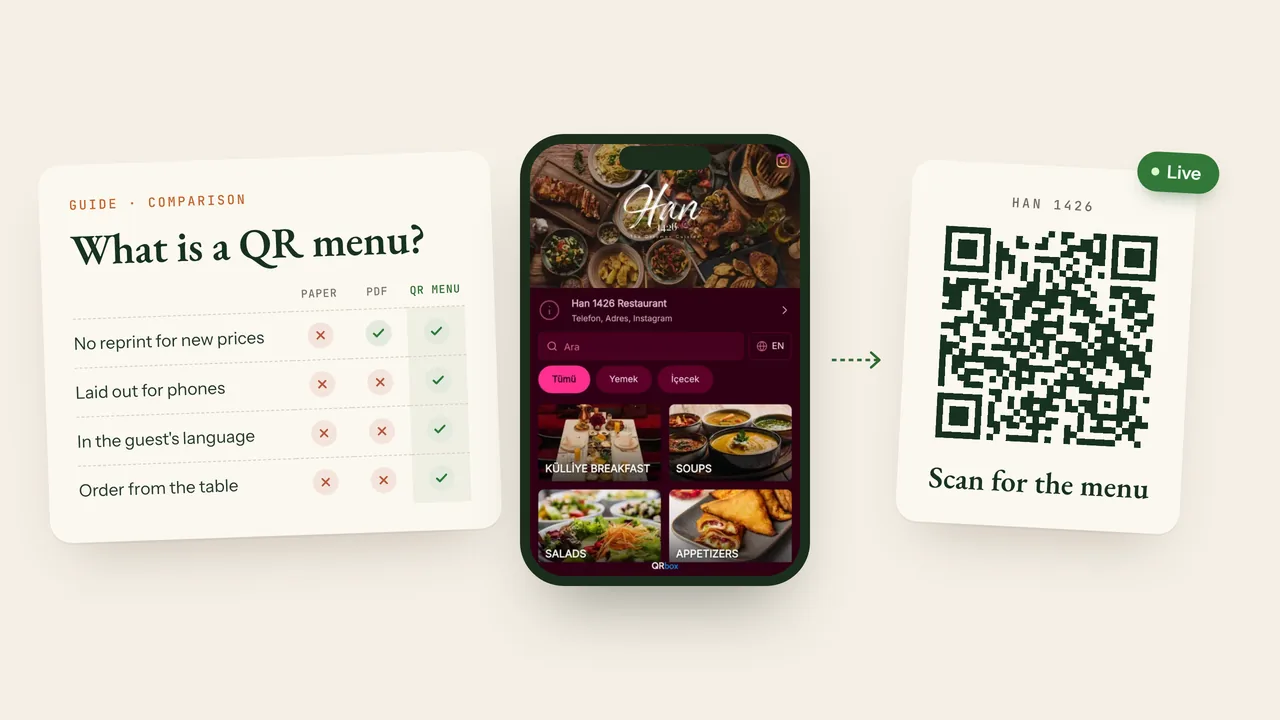
A QR menu (or QR code menu) is a digital menu that opens in a guest's phone browser when they scan the QR code on the table with their camera. There is no app to download and no account to create. The code only holds the menu's web address; the menu itself lives at that address, so when the restaurant changes a price or a dish, the code on the table stays the same and guests always see the current menu.
This guide covers how a QR menu works, the different kinds, how it compares with paper and PDF menus, what it costs, the rules worth knowing and what to look for when you choose a QR menu system. The comparisons are in tables, so you can read it from the top or jump to the part you need.
In short
- A QR menu is a digital menu opened by a QR code. The guest scans the code and the menu opens in the phone's browser.
- The code stays, the menu changes. A new price, dish or photo needs no reprint.
- Not every QR menu is the same. A code that opens a PDF file and a menu page built for phones, in several languages, are two very different experiences for a guest.
- No country we know of currently requires a QR menu, but some rules apply to one. Some countries ask for a printed price list as well, and allergen rules apply to digital menus too.
- When choosing, check: whether the code is permanent, how the menu reads on a phone, languages, how easily prices change, hidden fees and commission on orders.
Contents
- What does QR menu mean?
- How does a QR menu work?
- Types of QR menu
- QR menu or paper menu?
- PDF menu vs digital QR menu
- Free QR code or a QR menu system?
- Benefits of a QR menu
- Drawbacks and how to fix them
- Are QR menus required?
- What a good QR menu includes
- Questions to ask before choosing a QR menu system
- How much does a QR menu cost?
- How to make a QR menu
- QR menu examples
- QR menus with QRbox
- Frequently asked questions
What does QR menu mean?
QR stands for "Quick Response". The QR code is a two-dimensional barcode developed in 1994 by the Japanese company Denso Wave to track car parts. A QR code can hold up to a few thousand characters; in a QR menu, what it holds is the menu's web address.
The same thing goes by several names: QR menu, QR code menu, digital menu, contactless menu, scan menu and e-menu usually all mean a menu opened from a code on the table and read on a phone. "Digital menu" is a little broader: it also covers digital menu boards on the wall and tablets on the table.
At the very least, a QR menu shows categories, dishes and prices. A good one adds photos, descriptions, portion sizes, allergens, calories and translations. Some also take orders and payments from the table.
Restaurants, cafés, hotels, bars, bakeries, fast food places, beach and pool bars, food trucks and canteens all use QR menus. Anywhere with a price list can.
How does a QR menu work?
For the guest it takes three steps:
- Scan. They point the phone's camera at the code on the table. iPhones (since iOS 11) and most Android phones today read QR codes from the camera app or Google Lens; no separate app is needed.
- Open. They tap the link that appears, and the menu opens in the phone's browser.
- Read. They browse the categories, tap a dish to see its photo and details, and pick their language if the menu has several.
Behind the scenes, the code contains the menu's address, for example yourrestaurant.qrbox.menu. The menu lives at that address on the web. The restaurant edits it from a dashboard; as soon as a change is saved, the menu at that address is updated, and guests see the new version when they open it. The QR code is like a signpost: the sign stays put, and what it points to changes.
Static and dynamic QR codes
This is the part people mix up most, and it affects your budget directly.
| Static QR code | Dynamic QR code | |
|---|---|---|
| What's inside? | The destination address itself | A redirect address |
| Can the destination change? | No, you print a new code | Yes, the code stays the same |
| Can it stop working? | Not while the destination is online | Yes, if the redirect service shuts down or your plan ends |
| Are scans counted? | No | Usually |
What matters more than the type of code is that the address it opens is permanent, and who controls it. Some free QR code generators switch "dynamic" codes off when a trial ends, or put an ad page in front of your menu. Waking up to find that every code on every table has stopped working is about as bad as it gets. With a QR menu system the code usually opens your menu's own address directly, so however often you change the menu, you never reprint the code.
Types of QR menu
Four different things are sold as a "QR menu":
- PDF or image menu. A PDF or photo of your paper menu is linked to a QR code. It's the fastest and cheapest route, but guests have to pinch and zoom on their phone, and every price change means a new file.
- Web-based digital menu. The menu is a web page laid out for phones. Prices change from a dashboard; dishes have photos, descriptions, allergens and languages. This is what most people mean by a QR menu today.
- QR menu with ordering. On top of the digital menu, guests can order from the table, call a waiter, ask for the bill and pay online. Orders go to the kitchen or a staff screen.
- App or tablet menu. The guest downloads an app, or uses a tablet on the table. Since it isn't opened with a QR code it isn't strictly a QR menu; it's here for comparison.
| PDF menu | Digital menu | QR menu with ordering | |
|---|---|---|---|
| When prices change | New file | Save in the dashboard | Save in the dashboard |
| On a phone | Pinch and zoom | Fits the screen | Fits the screen |
| Photos and allergens | As much as fits the page | On every dish | On every dish |
| Other languages | A separate file | Guest picks a language | Guest picks a language |
| Ordering from the table | No | No | Yes |
| Cost | Usually free | Free plan or subscription | Subscription, sometimes commission on orders |
A tablet menu's advantage is that guests don't need their own phone; its cost is a device for every table, plus charging, breakage and cleaning. Menus that need an app have a hard first step: most guests won't download an app just to look at a menu.
QR menu or paper menu?
| Paper menu | QR menu | |
|---|---|---|
| Price changes | Reprint | Save the change |
| Upfront cost | Design and printing | Table cards; software free or by subscription |
| Ongoing cost | Reprints for every price change and worn copy | A monthly or yearly subscription, if any |
| Sold-out dishes | The server tells guests, or it's crossed out | Marked sold out or hidden |
| Foreign guests | A separate printed menu per language | Guests pick their language; the menu can open in their phone's language |
| Photos | Limited by the number of pages | On any dish |
| Allergens and calories | Take up space, often left out | Kept in each dish's details |
| Internet | Not needed | Needed (mobile data or Wi-Fi) |
| Contact with guests | The server brings the menu and explains it | Guests read on their own; the server has more time for recommendations |
The answer for most places is both: a QR menu on the table, and a printed menu for guests who ask for one (in some countries, such as Turkey, a printed price list is also required at the entrance). If the printed menu and the QR menu come from the same source, they can't show different prices. With QRbox you download a print-ready PDF of your QR menu.
PDF menu vs digital QR menu
A code that opens a PDF is technically a QR menu too, and it's often the first thing restaurants try. For guests, the difference shows up here:
- Reading: a page designed for A4 is tiny on a phone screen, so guests zoom in and pan around. A digital menu fits the width of the screen, with text at a readable size.
- Loading: a scanned or photo-heavy PDF can be several megabytes and slow to open on a weak connection. A well-built digital menu shows the text first and the photos after.
- Updating: every change means making and uploading a new PDF. If the code points at the file itself, the code changes too.
- Languages: in a PDF each language is either a separate file or crammed onto the same page. In a digital menu, guests choose.
- Accessibility: screen readers can't read the text in a scanned PDF, and the phone's large-text setting doesn't apply. A digital menu works with those settings.
- Search engines: the dishes and prices in a digital menu are plain text that search engines can read. You can also add your menu's address to your Google Business Profile as your menu link.
A PDF can be enough to start with for a small place whose menu changes once a year and that doesn't see foreign guests. For a restaurant that changes prices often, welcomes tourists or wants to show photos of its dishes, a digital menu is far easier.
Free QR code or a QR menu system?
There are five ways to put your menu behind a QR code, each with its own cost and limits:
| Option | Upside | Watch out for |
|---|---|---|
| Free QR code generator + PDF | Free, ready in minutes | Hard to read on a phone; some codes stop working after a while or show ads |
| QR menu sites with a free plan | Try a digital menu for free | Limits on dishes, categories or languages, ads on your menu, ordering only on paid plans |
| Subscription QR menu system | A menu built for phones, several languages, unlimited updates | A monthly or yearly fee; features vary a lot between providers |
| The QR menu in your POS system | Orders land in the same system as the till | Usually means buying the POS; the menu's design can be an afterthought |
| Your own website | The menu is fully on your own domain | Languages, allergens and quick price changes need extra software or an agency |
Which suits whom?
- A small, single-language place whose menu rarely changes: can start with a PDF; make sure the code opens a permanent address.
- Any place that changes prices often and wants photos and descriptions: a subscription QR menu system.
- Places with many tourists, and hotels: a multilingual digital menu that opens in the guest's language.
- Busy cafés and restaurants where servers can't keep up: a QR menu with ordering. Always check whether it takes a commission on orders.
Benefits of a QR menu
- No reprints. When prices change, you edit and save instead of reprinting. The table cards are printed once.
- Prices are always right. One menu updated in one place means fewer mismatches between the menu and the bill.
- Foreign guests read in their own language. Dish names and descriptions are shown in other languages too. Some systems open the menu in the language of the guest's phone, so servers don't have to translate.
- Photos and details. Guests decide what to order from the photo and the description. Information that crowds a paper menu sits in the details that open when a dish is tapped.
- Allergens and ingredients. Showing ingredients, allergens and calories under every dish becomes easy.
- Sold-out dishes come off the menu. Mark a dish sold out or hide it, and guests see it before they order.
- Staff time. Less time spent handing out and collecting menus, translating, and answering "how much is this?".
- Hygiene. Guests use their own phone instead of a menu passed from hand to hand.
- You can measure it. You see how often your menu is opened and in which languages.
- A way into ordering and payment. The same code can take table orders, waiter calls and online payments.
- Visibility on Google. Your menu's address can go on your Google Business Profile as your menu link, so people who find you on Google Maps can open your menu from there.
Drawbacks and how to fix them
QR menus have downsides too. Most of them have a simple fix:
- They need the internet. Where the signal is weak, a guest may not be able to open the menu. Fix: print the Wi-Fi name and password on the table card, and choose a light digital menu rather than a PDF.
- Not every guest wants to read a menu on a phone. Older guests, a flat battery, a phone left at home. Fix: keep a few printed menus. In some countries you must hand one over when asked.
- A badly made QR menu is worse than paper. Tiny text in a PDF, a slow page or dishes without prices wear guests out. Fix: choose a menu built for phones, and try it on a few different phones before you put it live.
- Less conversation with guests. Fix: a QR menu isn't there to replace your servers, only to free them from carrying menus. Let them keep making recommendations.
- Fake QR codes. Scammers can stick their own code over the one on the table and send guests to a fake page, such as a fake payment page. This is called "quishing". Fix: print the code inside the stand or under the lamination, so a sticker on top stands out. Print your menu's address under the code, and check your codes now and then.
- Lock-in. If the code points at a provider's redirect address and the service ends, your codes stop working. Fix: before you start, ask where the code points, what happens when your plan ends, and whether you can download your menu as a PDF.
Are QR menus required?
We don't know of any country that currently makes restaurants use a QR menu. What does exist are rules a QR menu has to fit into:
- Printed price lists. In Turkey, for example, the price list at the tables may be shown with a QR code, but there must be a price list at the entrance, and a guest who asks must be given one. Turkish menus must also show prices including all taxes, with the date they apply from, and may not mention a service charge. We cover the Turkish rules in detail in QR Menü Zorunlu mu? (in Turkish).
- Allergen information. In the European Union, restaurants must tell guests about the 14 major allergens in the food they serve (Regulation (EU) No 1169/2011); each country decides how. A digital menu can carry this information, but check your country's rules on whether it must also be available in writing or by asking staff.
- Calories. In the United States, restaurant chains with 20 or more locations must show calories on their menus and menu boards (the FDA's menu labeling rule).
The safest setup almost everywhere is a QR menu at the table and a printed menu for guests who need one. This is general information, not legal advice; check your local rules.
What a good QR menu includes
Whatever system you use, the menu that opens on a guest's phone should have:
- A quick start. It opens within a few seconds of the scan.
- A layout for phones. Text is readable without zooming, categories are a tap away, and long menus have search.
- A price on every dish. Each portion or size with its own price.
- A price note. Whether prices include tax, and if your local rules ask for it, since when they apply.
- The right photos. Photos of the dish itself. A dish without a photo is better than one with the wrong photo.
- Descriptions, ingredients and allergens.
- Your guests' languages. Translations into the languages your guests speak most.
- Your details. Address, phone number, opening hours and Wi-Fi.
- A design that fits your brand. Your logo, cover photo and colours.
- A short address. One you can print under the code for guests who can't scan it.
Questions to ask before choosing a QR menu system
| Question | Why it matters |
|---|---|
| Where does the code point, and what happens if my plan ends? | The codes on your tables should never stop working |
| How does the menu look on a phone? | Open a sample menu on your own phone |
| How many taps does it take to change a price? Can I raise all prices at once? | It saves you hours when prices go up |
| How many languages, and is translation included? | Decisive if you welcome tourists |
| Are there limits on dishes, categories or scans? | Cheap plans usually hide their limits here |
| Is there a setup fee, and who enters the menu? | Typing hundreds of dishes by hand can take days |
| Is there a commission on orders? | On menus with ordering, that's where the real cost is |
| Can I get a printed menu or a PDF? | For the printed price list and guests who ask |
| Does the free trial ask for a card? | So you can try it with your real menu at no risk |
| What language is support in, and who answers? | So you get an answer when something goes wrong |
How much does a QR menu cost?
The cost of a QR menu is made of five parts:
- Table cards or stands. Printed once; laminated cards or acrylic stands outlast paper.
- Software. From free options up to a monthly or yearly subscription.
- Setup. Some providers charge to enter or design your menu.
- Commission on orders. Some ordering systems take a cut of every order.
- Card fees. For online payments, the payment provider takes its own processing fee.
To see whether a QR menu pays for itself against printing, multiply number of menus × printing cost per menu × price changes per year, and compare that yearly printing bill with a yearly subscription. For places that change prices more than once or twice a year, the sum usually favours the QR menu.
As of November 2026, QRbox has one plan: US$9.99 a month or US$107.88 a year, and tax may be added. There's no setup fee and no commission on orders; table ordering, delivery orders and online payment are included. See the current price on our pricing section.
How to make a QR menu
In five steps:
- Import your menu. Take a photo of your paper menu or upload its PDF; QRbox reads the categories, dishes and prices into a draft.
- Check prices and details. Add sizes, photos and allergens.
- Pick a design and colours. Add your logo and a cover photo.
- Add languages. Translate with AI, then check.
- Download and print the QR code. For a code scanned at the table, 3 × 3 cm (about 1.2 × 1.2 in) is a good minimum. Print it dark on a light background with a margin around it, and test it with a few phones before printing many.
The import is explained step by step in Turn Your Paper Menu into a QR Menu with One Photo. You can also build or edit your menu by chatting with ChatGPT or Claude.
QR menu examples
The same menu can look completely different in another design. Here is one sample café menu in QRbox's designs:
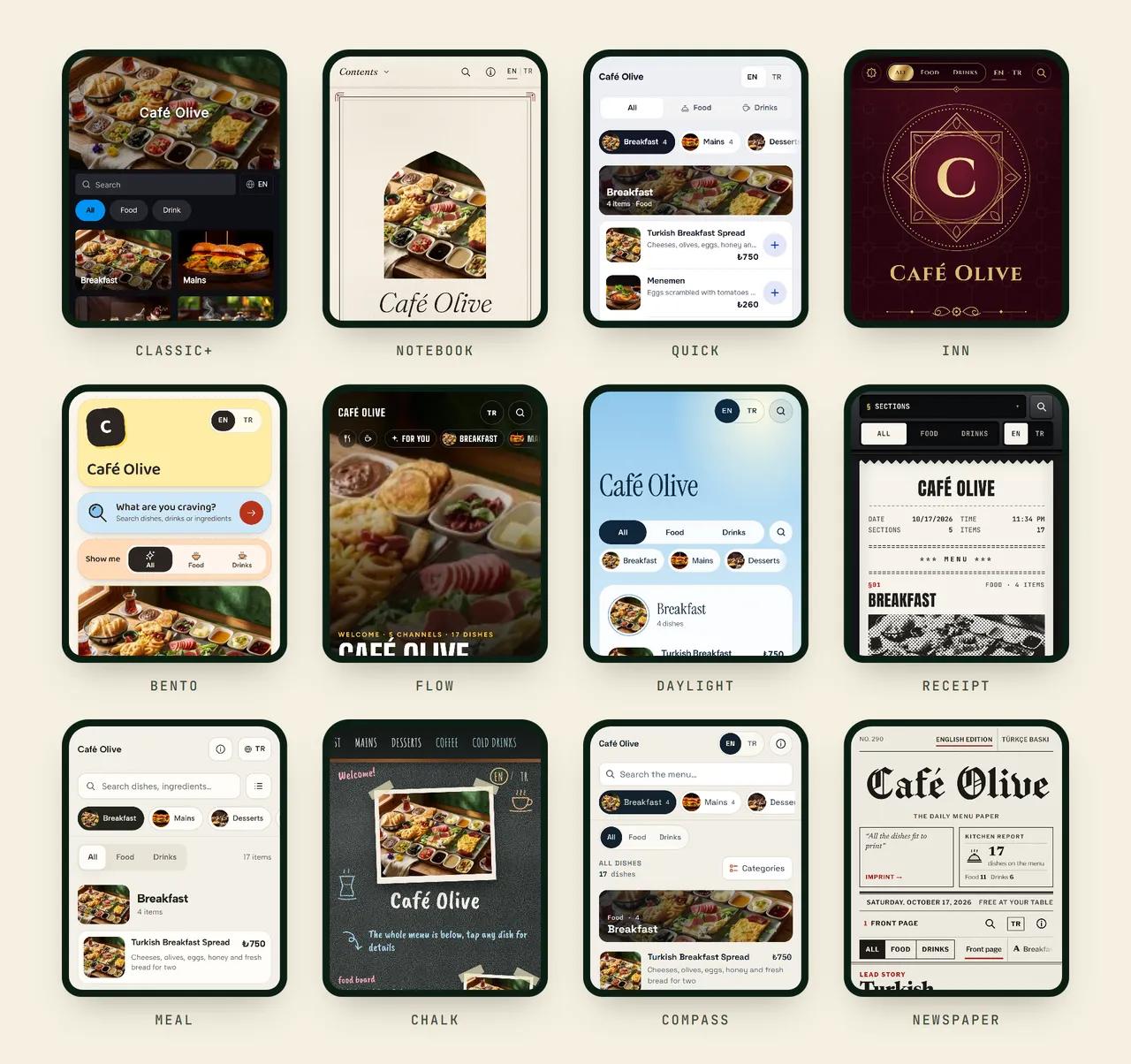
Every design is introduced in 13 Themes for Your QR Menu.
QR menus with QRbox
QRbox is a multilingual QR menu system for restaurants and cafés. Here's how it covers what this guide describes:
- Import from a photo: dishes and prices are read from a photo or PDF of your paper menu; nothing is added until you confirm it.
- A permanent address: your menu opens at a short address such as
yourrestaurant.qrbox.menu, and the QR code stays the same when you change the menu. - Up to 5 languages: translated with AI, and opened in the language of the guest's phone.
- Allergens and ingredients: the 14 major allergens, ingredients and calories on every dish.
- A printed menu: a print-ready PDF of the same menu.
- Ordering and payment: table ordering, delivery orders and online payment are included, and QRbox takes no commission on orders.
You can try QRbox free for 14 days with every feature; no credit card needed.
Frequently asked questions
What is a QR menu?
A QR menu is a digital menu that opens in a guest's phone browser when they scan the QR code on the table with their camera. No app is needed, and when the restaurant changes the menu, the code stays the same.
Is a QR code menu the same as a digital menu?
Mostly, yes. A QR code menu is a digital menu opened by scanning a code. "Digital menu" can also mean digital menu boards on the wall or tablets on the table.
What is a QR menu used for?
It keeps the menu up to date without reprinting when prices or dishes change, shows dishes with photos and in other languages, and gives allergen information. On QR menus with ordering, guests can also order and pay from the same code.
Do guests need an app to use a QR menu?
No. They scan the code with the phone's camera and the menu opens in the browser. They don't need to sign up either.
Does a QR menu work without the internet?
No. The menu lives online, so the phone needs mobile data or Wi-Fi. Where the signal is weak, printing the Wi-Fi details on the table card helps.
Are QR menus required?
Not as far as we know: we know of no country that currently requires one. Some countries do ask for a printed price list as well, and allergen rules apply to digital menus too.
Do I need to reprint the QR code when the menu changes?
Not if your code opens your menu's permanent address. Whatever you change, the printed code opens the current menu. If the code opens a PDF file, a new file can mean a new code.
Do QR codes expire?
The code itself never expires. But if it points at a redirect service and that service ends, the code can stop working. Ask where the code points before you start.
Are QR menus free?
Both exist. Linking a PDF to a free code costs nothing; a multilingual digital menu built for phones usually comes with a monthly or yearly subscription. You can try QRbox free for 14 days.
Can guests order from a QR menu?
On QR menus with ordering, yes. Guests send their order from the code on the table, call a waiter or ask for the bill, and the order reaches the kitchen or a staff screen. Some systems take a commission on orders; QRbox doesn't.
Which businesses can use a QR menu?
Any business with a price list: restaurants, cafés, hotels, bars, bakeries, fast food places, beach and pool bars, food trucks and canteens.