13 Themes for Your QR Menu, from a Chalkboard to a Newspaper
Your QRbox menu can now look like a printed notebook, a café chalkboard, a till receipt or a newspaper. Pick a theme and a color, add your brand color and preview it before guests see it.
· 5 min read
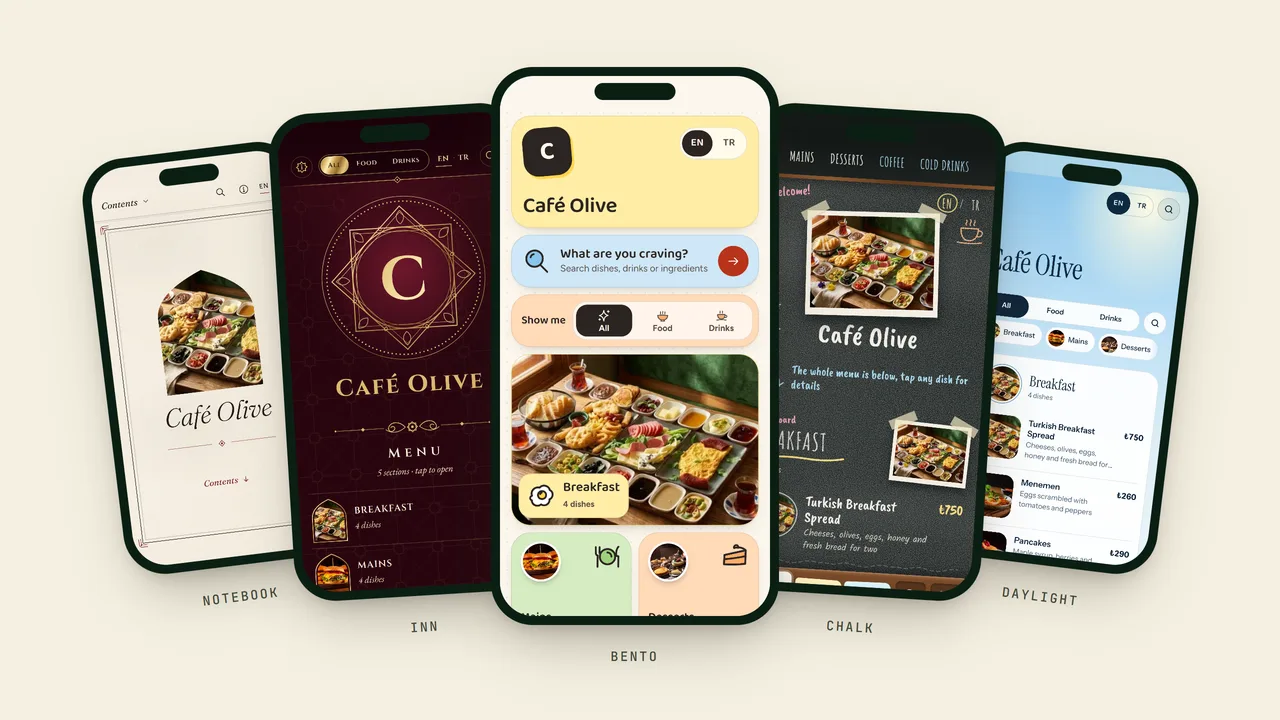
Until now every QRbox menu had the same design, in the colors you picked. A cocktail bar and a breakfast café looked like relatives. That changes today: your menu now has 13 themes to choose from. Each one is a complete design, with its own layout, type and character, so the menu your guests open can feel like your place.
Your dishes, prices, photos and translations stay exactly as they are. A theme only changes how they are shown, and your QR code keeps working without a reprint.
The themes
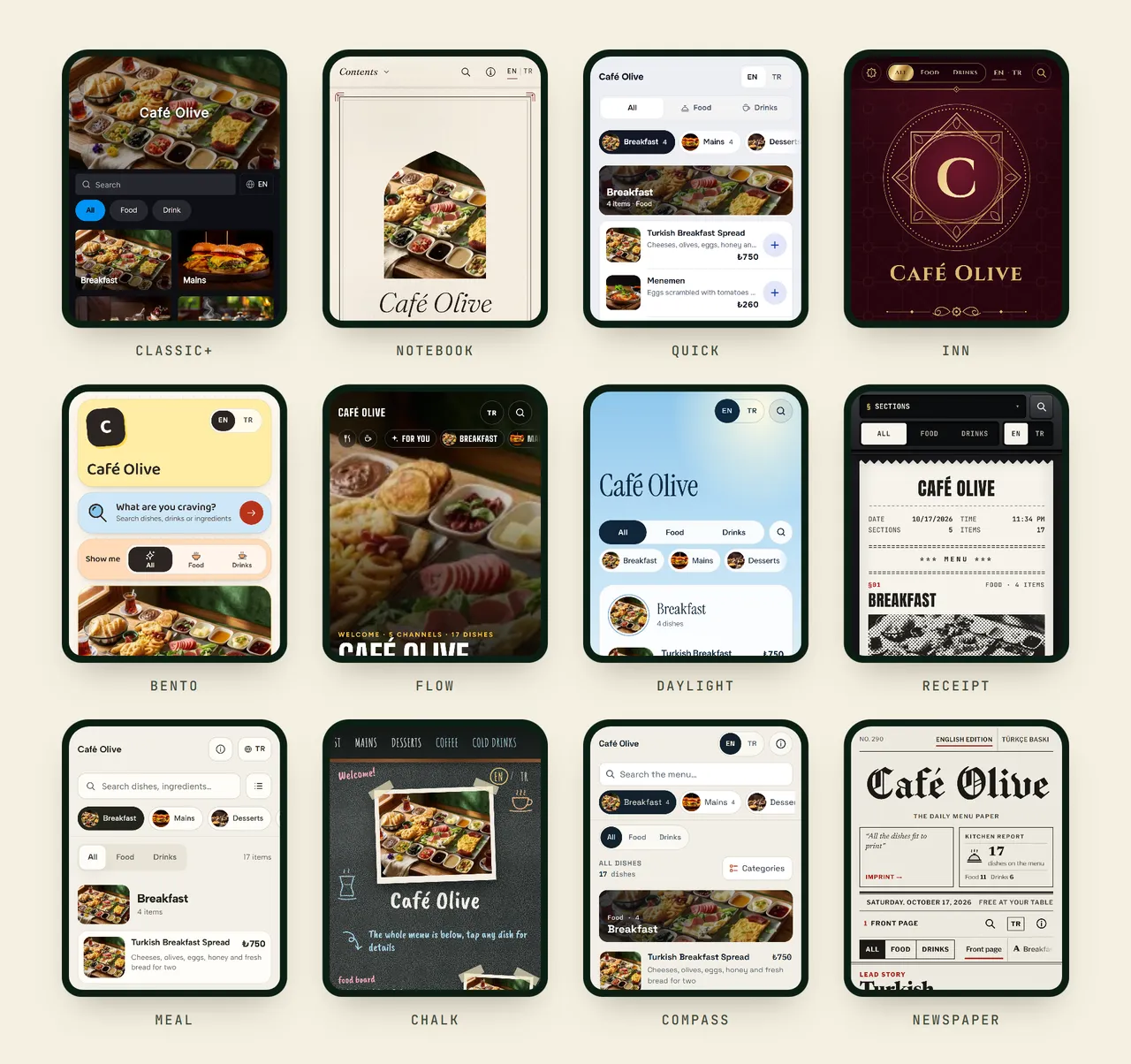
Every picture above is the same menu. Only the theme changes.
- Classic is the menu you have today, with a cover photo and category tiles. If you are happy with it, you do not need to do anything.
- Classic+ is Classic refreshed: pill-shaped buttons and photo category tiles.
- Notebook is an elegant printed menu, with serif type and dotted lines leading to the price. It suits restaurants with a menu people read slowly.
- Quick works like a fast app: tabs at the bottom, compact rows and a "My list" where guests collect what they want to order.
- Inn is Ottoman ruby and gold, ornate and ceremonial. Made for traditional cuisine and hotel restaurants.
- Bento is a playful mosaic of pastel tiles.
- Flow shows one dish per screen, full screen, and guests swipe up to the next, like a video feed. It is at its best when your dishes have good photos.
- Daylight is built from layers in the colors of the sky, with a large serif title and soft panels.
- Receipt looks like a slip from a thermal printer: typewriter type and dashed rules.
- Meal is a warm, simple menu of photo cards.
- Chalk is the café chalkboard, written by hand.
- Compass is a clean, technical list with search, categories and tag filters, for long menus where guests know what they are looking for.
- Newspaper turns your menu into a front page, with headlines and columns.
Every theme comes in its own colors
The new themes do not take just any color. Each one comes with three or four color versions made for it, so the design stays readable whichever you pick. Notebook comes in Cream, White, Sage and Night; Receipt in Thermal paper, Yellow copy, Pink copy and Carbon blue; Chalk in Black, Green and Navy slate. Most themes also have a dark version for bars and evening service.
Classic and Classic+ keep the color options you know.
Add your brand color
If your café has a color, the menu can wear it. Turn on Use your brand color, pick one of the ten ready colors or type your own color code, and the prices, buttons and highlights appear in it.
A color that looks great on your logo can be hard to read on a menu. QRbox checks it against the theme's background, and when the contrast is too low it darkens or lightens the shade just enough to read well. You see both colors side by side before you save, so nothing changes behind your back.
Try a theme before your guests see it
You will find the themes in the menu editor under Settings → Appearance. Choose a theme and a color, and the live preview next to it shows your own menu in that design right away, with your dishes and photos. Open the preview full screen to see it the way a guest will on their phone, and step through the themes with the arrows.
Nothing changes for your guests until you press Save. If you have a busy service, try themes as long as you like; your live menu keeps its current look in the meantime. To make the choice easier, the full gallery can be filtered by style: simple, colorful, playful or photo-led.
Which theme should you choose?
There is no wrong answer, but a few rules of thumb help:
- Lots of good photos? Flow, Meal, Bento and Classic+ put them first.
- Few or no photos? Notebook, Receipt, Newspaper and Chalk are built around type and look complete without pictures.
- A long menu? Quick and Compass get guests to a dish fastest, with search and compact rows.
- A strong identity? Inn, Chalk and Receipt make the menu part of the experience.
The best test is your own menu. Open the preview, try three themes and pick the one that feels like your place.
Frequently asked questions
Do the themes cost extra?
No. Every theme is part of QRbox, including during the 14-day free trial.
Do I need a new QR code if I change the theme?
No. Your QR code and your menu link stay the same. Change the theme today, change it again next season, and the printed codes on your tables show the new design right away.
Will I lose my menu if I switch themes?
No. Your categories, dishes, prices, photos and translations are not touched. A theme only changes how they are presented, and you can go back to Classic at any time.
Do the themes work with menus in several languages?
Yes. Every theme has a language switch, so guests can read your menu in any of the languages you offer.
Give your menu a new look
Open your menu, go to Settings → Appearance and try a few themes on your own dishes. New to QRbox? Start your free trial, turn your paper menu into a QR menu with one photo, then choose the theme that fits it.