Menu importIncluded in every plan
Snap your paper menu. Get a QR menu.
QRbox reads the sections, dishes and prices from a photo of the menu you already have. Check them, pick a design and print your QR code. Most menus are live in a few minutes.
14 days free trial · No credit card required
Külliye Breakfast 3 dishes
Soups 3 dishes
Salads 3 dishes
Read 3 sections, 9 dishes and 9 prices. Check them, then publish.
- Checked before you publishhan-1426-menu.jpg
- 3 sections found
- Every dish has a price
- 2 descriptions kept
- Prices read as Turkish lira
Trusted by over 1000 businesses worldwide
See our references






How it worksThree steps
From paper menu to QR menu in minutes
No typing. You can do all of it from your phone.
- 1
Take a photo of your menu
Open “Import from a photo” and snap each page of your paper menu, or choose photos you already have.
- 2
QRbox reads it for you
Categories, items and prices are filled in. Check them, add photos from our library with one tap and translate them into your guests’ languages.
- 3
Print your QR code
Publish the menu, download the QR code and put it on your tables. Guests scan it and see the menu in their own language.
Designs12 themes
Same menu, 12 designs.
Every design uses the dishes you imported, so there is nothing to retype. Swipe, use the arrow keys or tap a design: the phone shows Han 1426 Restaurant’s menu in it.
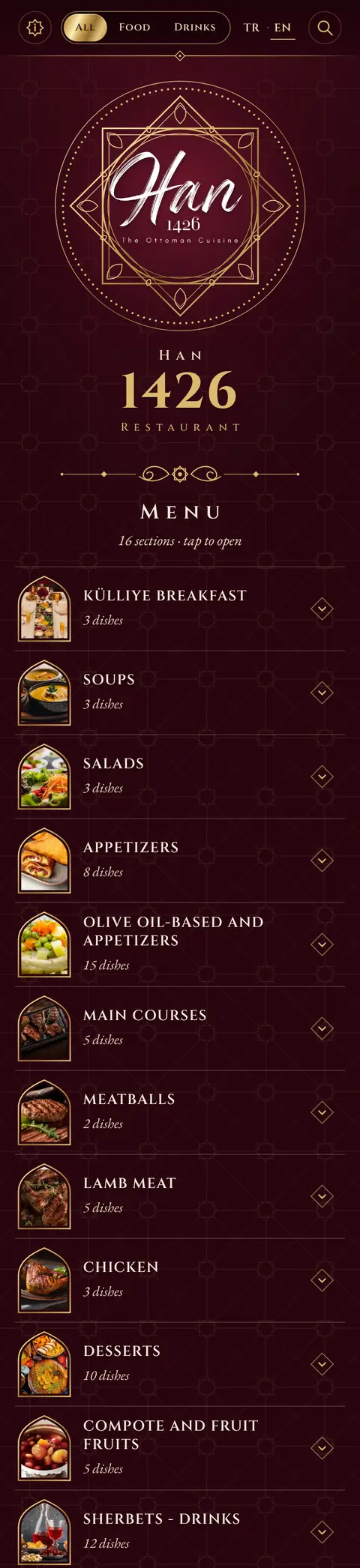
Each design has colour versions, and your brand colour goes on top.
Every feature, one plan
The menu keeps changing. The QR code doesn’t.
A paper menu needs a reprint for every new price. A QR menu changes the moment you save.
Instant Visibility Control
Hide out-of-stock products or temporarily unavailable categories with a single click and reactivate them anytime.
Multi-Language Support
Cater to all your local and international customers by automatically publishing your menu in over 150 languages.
Lentil Soup with Bone MarrowWith melted village butter
Easy Management with Drag-and-Drop
Easily manage your menu from mobile, tablet, or computer. Change the order of categories and products in seconds by dragging and dropping.
Rich Image Library
Instantly access our archive of over 5,000 high-quality, professional food photos to make your menu more appealing.
Calories, Ingredients and Allergens
Show calories per portion, ingredients and the 14 major allergens on every dish. AI fills them in from the dish name; you check and save.
Smart Product Tags
Inform your customers by adding eye-catching tags like 'New', 'Sold Out', 'Spicy', or 'Vegan' to your products.
50+ Menu Color Themes
Choose from over 50 professionally designed color themes to match your brand style.
Detailed Statistics and Reports
Gain valuable data about your business by tracking menu views, most popular items, and more.
Printable PDF Menu
Meet your paper menu needs by converting your digital menu into a stylish, print-ready PDF format with a single click.
AI Menu Translation
Translate dish and category names and descriptions into all your menu languages with a single click.
Custom Domain Support
Strengthen your brand identity by publishing your menu on your own domain.
Bulk Price Updates
Update the prices of all your products effortlessly and instantly from a single screen with the 'Easy Edit' mode.
Customizable Menu Designs
Choose the most suitable of 3 different modern menu layouts for your brand to provide the best experience for your customers.
Unlimited Products and Categories
Freely expand your menu by adding as many categories and products as you like, with no restrictions.
Menu editing with ChatGPT and Claude
Connect QRbox to Claude or ChatGPT once. Share a photo of a menu, ask for a price change or a new language, and it edits your QRbox menu for you.
Share a photo of the menu
The assistant reads it and adds the sections and dishes.
Ask for changes in plain words
Prices, new dishes, translations or sold-out items. It asks before it changes what is already on the menu.
14 days free trial
One plan. Every feature.
Start with a 14-day free trial with every feature. No credit card required.
- Import from a photo
- No extra or hidden charges
- Unlimited scans
- Unlimited categories and dishes
- Multi-language support
- AI menu translation
- Calories, ingredients and allergens with AI
- Image library access
- Custom domain support
- Statistics and reports
- Menu theme color customization
- Convert your digital menu into PDF
- Claude and ChatGPT connector
Cancel any time from your billing page; your plan stays active until the end of the period you paid for.
Each menu has its own subscription.
For multi-location enterprises: Contact us
What is QRbox?
QRbox is a digital menu for restaurants, cafes, bars and hotels. You build your menu once, print a QR code, and guests open the menu on their phone by scanning it.
How long does it take to set up?
Most menus are live in a few minutes. Create an account and take a photo of your paper menu: QRbox adds your categories, dishes and prices for you, or you can add them by hand. Then download your QR code and print it. You can do all of it from your phone.
Can I create my menu from my existing paper menu?
Yes. Take a photo of each page and QRbox reads the categories, dishes and prices for you. You check everything before it is added, and you can add photos from our library and translations in the same step. It is included in every account, also during the free trial.
Do my guests need to download an app?
No. Scanning the QR code with the phone camera opens the menu in the browser. There is nothing to install and no sign-up for guests.
Can I change the menu after I print the QR code?
Yes. Change prices, add dishes or hide sold-out items whenever you like. Changes appear on the menu as soon as you save, and the QR code stays the same, so you never need to reprint it.
Can my menu be in more than one language?
Yes. Add up to 5 languages to a menu and translate dish names and descriptions with one click using AI. Guests choose their language when they open the menu.
Can I show allergens, calories and ingredients?
Yes. Each dish can show calories, ingredients and the 14 major allergens. AI can fill them in from the dish name; you review and save.
Do I need photos of my dishes?
No. You can upload your own photos or pick from our library of more than 5,000 professional food photos.
Is there a free trial?
Yes. Every new account gets a 14-day free trial with all features. No credit card is required to start.
How does pricing work, and can I cancel?
There is one plan with every feature included, billed monthly or yearly; the yearly plan costs less per month. You can cancel at any time from your billing page, and your plan stays active until the end of the period you paid for.
Can I manage more than one restaurant?
Yes. You can create several menus under one account, for example for a second location. Each menu has its own subscription.
How can I get help?
Write to us at [email protected] or through the contact page, and we will help you set up your menu. Step-by-step guides are in our documentation.